> ## Documentation Index
> Fetch the complete documentation index at: /llms.txt
> Use this file to discover all available pages before exploring further.
# Payment Links
> Generate shareable payment links to collect payments without any code.
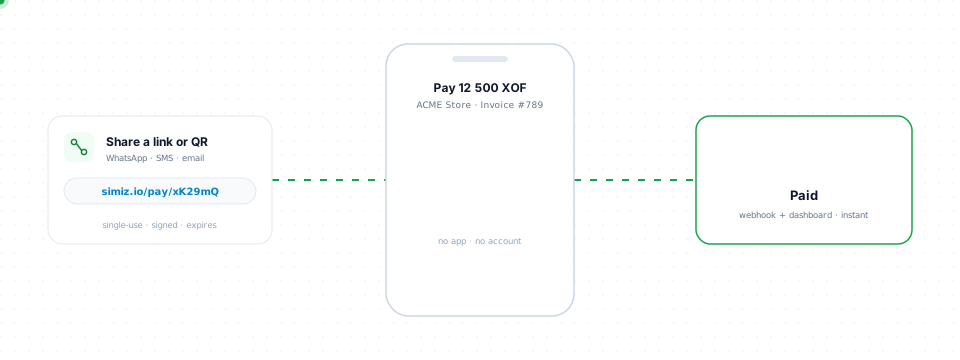
Payment Links let you collect payments by sharing a URL — no integration required.
 ## When to use Payment Links
* **Invoicing** — Send payment requests via email, SMS, or WhatsApp
* **Social selling** — Share links on social media
* **No-code payments** — Accept payments without a website
* **One-time charges** — Collect specific amounts from specific customers
## Create a Payment Link
1. Go to **Dashboard → Payment Links**
2. Click **Create Link**
3. Set the amount, currency, and description
4. Share the generated URL with your customer
## Features
| Feature | Description |
| ---------------------------- | -------------------------------------------------------------------------------------------------- |
| **Fixed or open amount** | Set a specific amount, or leave empty to let the customer enter the amount (with optional min/max) |
| **Expiration** | Set an expiry date for time-limited offers |
| **Multi-use** | Accept multiple payments on the same link (set `maxUses` or leave unlimited) |
| **Customer data collection** | Collect phone, email, and/or name at checkout |
| **Metadata** | Attach custom key-value data for reconciliation |
## Link statuses
| Status | Description |
| ---------- | ----------------------------------- |
| `ACTIVE` | Link is available for payments |
| `EXPIRED` | Link has passed its expiration date |
| `INACTIVE` | Link was manually deactivated |
Use **multi-use** links for recurring scenarios like donations. Set `maxUses` to limit the number of payments a link can accept.
## When to use Payment Links
* **Invoicing** — Send payment requests via email, SMS, or WhatsApp
* **Social selling** — Share links on social media
* **No-code payments** — Accept payments without a website
* **One-time charges** — Collect specific amounts from specific customers
## Create a Payment Link
1. Go to **Dashboard → Payment Links**
2. Click **Create Link**
3. Set the amount, currency, and description
4. Share the generated URL with your customer
## Features
| Feature | Description |
| ---------------------------- | -------------------------------------------------------------------------------------------------- |
| **Fixed or open amount** | Set a specific amount, or leave empty to let the customer enter the amount (with optional min/max) |
| **Expiration** | Set an expiry date for time-limited offers |
| **Multi-use** | Accept multiple payments on the same link (set `maxUses` or leave unlimited) |
| **Customer data collection** | Collect phone, email, and/or name at checkout |
| **Metadata** | Attach custom key-value data for reconciliation |
## Link statuses
| Status | Description |
| ---------- | ----------------------------------- |
| `ACTIVE` | Link is available for payments |
| `EXPIRED` | Link has passed its expiration date |
| `INACTIVE` | Link was manually deactivated |
Use **multi-use** links for recurring scenarios like donations. Set `maxUses` to limit the number of payments a link can accept.