> ## Documentation Index
> Fetch the complete documentation index at: /llms.txt
> Use this file to discover all available pages before exploring further.
# Payment Architecture
> Understand how payments work in Simiz — lifecycle, statuses, and provider routing.
# Payment Architecture
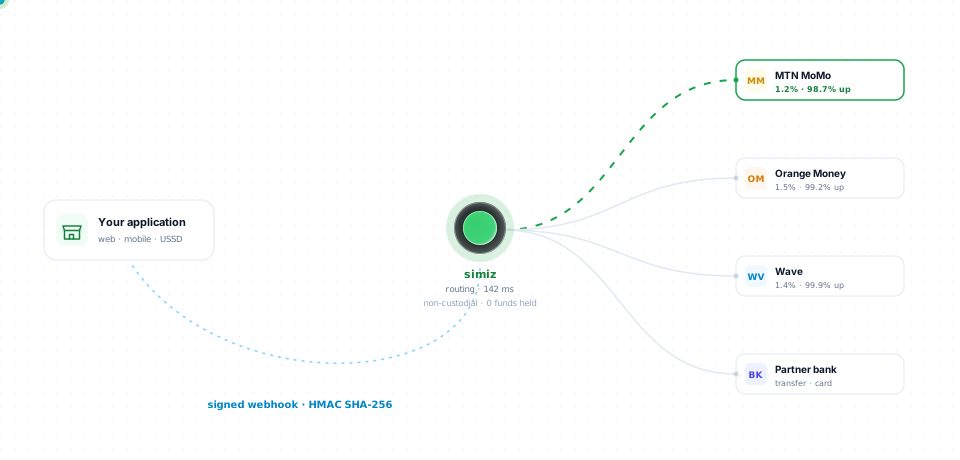
Simiz provides a unified abstraction layer over multiple African payment providers. This page explains how payments flow through the system.
## Non-custodial orchestration
Simiz is **non-custodial orchestration software**: it routes and normalizes payment flows via APIs and does **not** operate the custody of end-customer funds. **Settlement and money movement are executed by licensed partner providers** (Mobile Money operators, banks, and other regulated payment institutions), subject to applicable rules in each corridor.
 ## Payment lifecycle
Every payment follows a predictable lifecycle:
```mermaid
stateDiagram-v2
[*] --> PENDING: Transaction created
PENDING --> PROCESSING: Provider confirms receipt
PROCESSING --> COMPLETED: Payment successful
PROCESSING --> FAILED: Payment declined
PENDING --> EXPIRED: Timeout (15 min)
PENDING --> CANCELLED: Cancelled by user
COMPLETED --> REFUNDED: Full/partial refund
```
## Payment statuses
| Status | Description | Final? |
| ------------ | -------------------------------------------------- | ------ |
| `PENDING` | Transaction created, waiting for customer action | No |
| `PROCESSING` | Provider is processing the payment | No |
| `COMPLETED` | Payment received successfully | Yes |
| `FAILED` | Payment was declined or failed | Yes |
| `EXPIRED` | Customer didn't complete within the timeout window | Yes |
| `CANCELLED` | Transaction was cancelled | Yes |
| `REFUNDED` | Payment was refunded (full or partial) | Yes |
Always rely on **webhooks** as the source of truth for payment status, not polling. See the [Webhooks guide](/en/core-concepts/webhooks/overview).
## Provider routing
Simiz routes the payment to the provider that matches the `payment_method` supplied for the transaction:
| Payment Method | Provider |
| -------------- | ---------------- |
| `ORANGE_MONEY` | Orange Money |
| `MTN_MOMO` | MTN Mobile Money |
| `WAVE` | Wave |
| `MOOV_MONEY` | Moov Money |
## Request flow
```mermaid
sequenceDiagram
participant Merchant
participant Simiz API
participant Provider
participant Customer
Merchant->>Simiz API: POST /v1/payments
Simiz API->>Provider: Initiate payment
Simiz API-->>Merchant: 201 Created (status: PENDING)
Provider->>Customer: USSD/Push prompt
Customer->>Provider: Enter PIN
Provider->>Simiz API: Payment confirmation
Simiz API->>Merchant: Webhook (payment.succeeded)
```
## Supported currencies
| Currency | Code | Region |
| --------------- | ----- | ------------------------------------ |
| CFA Franc BEAC | `XAF` | CEMAC (Cameroon, Gabon, etc.) |
| CFA Franc BCEAO | `XOF` | WAEMU (Senegal, Côte d'Ivoire, etc.) |
Amounts are always in the **smallest currency unit**. For XAF and XOF, this is 1 franc (no cents).
## Next steps
Deep dive into Mobile Money payment flows.
Set up and manage recurring payment schedules.
## Payment lifecycle
Every payment follows a predictable lifecycle:
```mermaid
stateDiagram-v2
[*] --> PENDING: Transaction created
PENDING --> PROCESSING: Provider confirms receipt
PROCESSING --> COMPLETED: Payment successful
PROCESSING --> FAILED: Payment declined
PENDING --> EXPIRED: Timeout (15 min)
PENDING --> CANCELLED: Cancelled by user
COMPLETED --> REFUNDED: Full/partial refund
```
## Payment statuses
| Status | Description | Final? |
| ------------ | -------------------------------------------------- | ------ |
| `PENDING` | Transaction created, waiting for customer action | No |
| `PROCESSING` | Provider is processing the payment | No |
| `COMPLETED` | Payment received successfully | Yes |
| `FAILED` | Payment was declined or failed | Yes |
| `EXPIRED` | Customer didn't complete within the timeout window | Yes |
| `CANCELLED` | Transaction was cancelled | Yes |
| `REFUNDED` | Payment was refunded (full or partial) | Yes |
Always rely on **webhooks** as the source of truth for payment status, not polling. See the [Webhooks guide](/en/core-concepts/webhooks/overview).
## Provider routing
Simiz routes the payment to the provider that matches the `payment_method` supplied for the transaction:
| Payment Method | Provider |
| -------------- | ---------------- |
| `ORANGE_MONEY` | Orange Money |
| `MTN_MOMO` | MTN Mobile Money |
| `WAVE` | Wave |
| `MOOV_MONEY` | Moov Money |
## Request flow
```mermaid
sequenceDiagram
participant Merchant
participant Simiz API
participant Provider
participant Customer
Merchant->>Simiz API: POST /v1/payments
Simiz API->>Provider: Initiate payment
Simiz API-->>Merchant: 201 Created (status: PENDING)
Provider->>Customer: USSD/Push prompt
Customer->>Provider: Enter PIN
Provider->>Simiz API: Payment confirmation
Simiz API->>Merchant: Webhook (payment.succeeded)
```
## Supported currencies
| Currency | Code | Region |
| --------------- | ----- | ------------------------------------ |
| CFA Franc BEAC | `XAF` | CEMAC (Cameroon, Gabon, etc.) |
| CFA Franc BCEAO | `XOF` | WAEMU (Senegal, Côte d'Ivoire, etc.) |
Amounts are always in the **smallest currency unit**. For XAF and XOF, this is 1 franc (no cents).
## Next steps
Deep dive into Mobile Money payment flows.
Set up and manage recurring payment schedules.